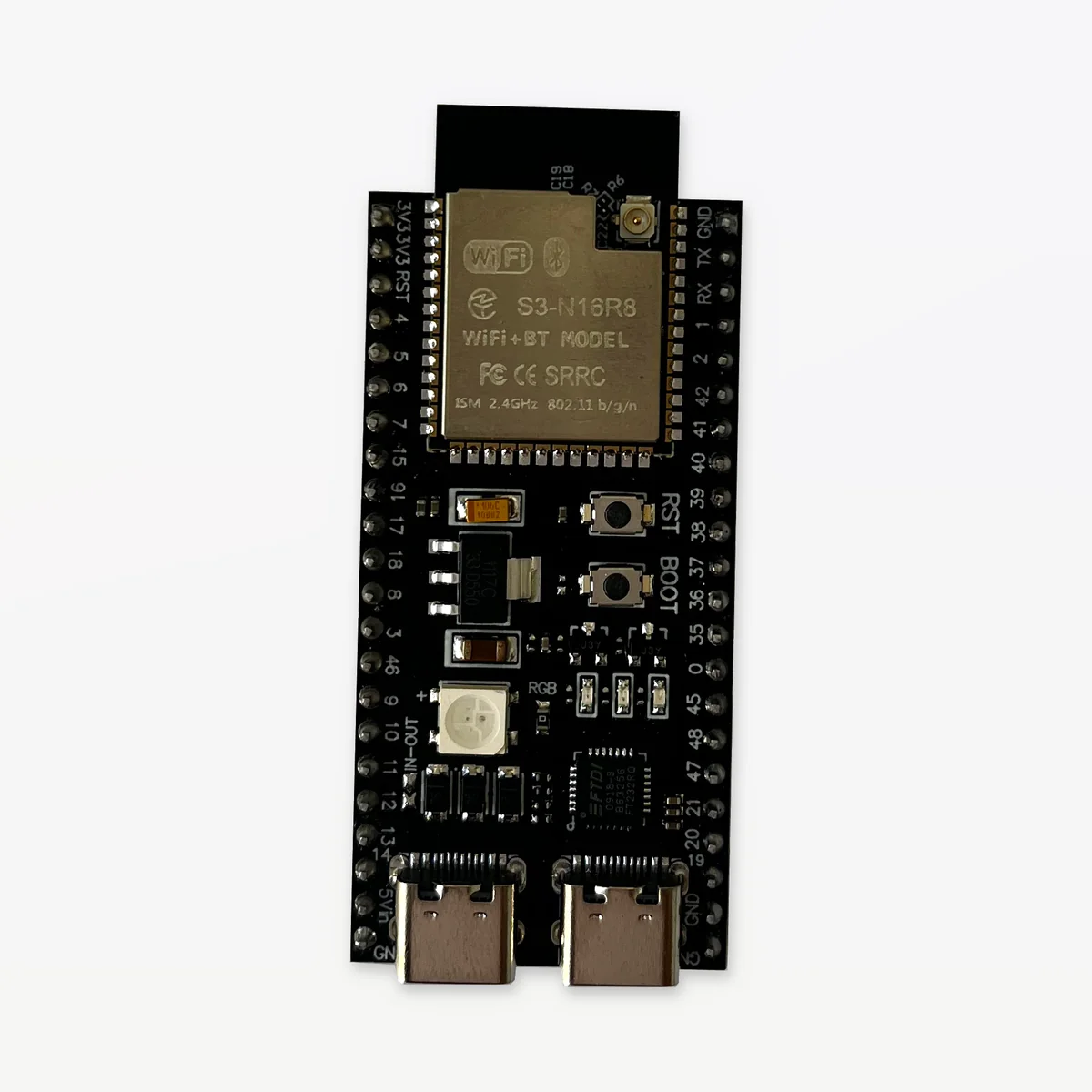
COM · USB-to-serial (FT232R)
Flash firmware with automatic download mode and watch the serial monitor. It stays connected while the ESP32-S3 resets, sleeps or changes its USB mode.
Electronics · ESP32 S3
Price per unit
$21.90 NZD
60 in stock
FT232R serial + native USB · Soldered headers · IPEX socket
Free Torbay pickup · $10.00 same-day delivery in eligible Auckland areas
ESP32-S3 dev board (YD-ESP32-23) with 16MB flash, 8MB PSRAM, Wi-Fi and Bluetooth 5 (LE). It has two USB-C ports: one runs through an FT232R USB-to-serial chip for flashing and serial monitoring, and the other connects straight to the ESP32-S3's native USB, so the board can act as a USB keyboard, mouse or other HID device for a computer or phone. It has a PCB antenna and an IPEX (U.FL) socket for an external antenna, an RGB LED, BOOT and RESET buttons, and pin headers already soldered on. In stock in Auckland and shipped fast across New Zealand.
Tap a method to pre-select it at checkout. Stock is reserved when you place your order.
Two USB-C ports
Most ESP32 boards have one USB port, so your serial log and the USB device you are building share a single port. This board has a separate port for each.
Flash firmware with automatic download mode and watch the serial monitor. It stays connected while the ESP32-S3 resets, sleeps or changes its USB mode.
Turn the board into a USB keyboard, mouse or game controller for a computer or phone (USB HID), or use USB OTG and native USB flashing.
Specifications
| Chip | ESP32-S3 (QFN56) |
|---|---|
| Processor | Dual-core Xtensa LX7, up to 240 MHz |
| Flash | 16MB Quad SPI |
| PSRAM | 8MB, in the chip package (the “R8” in N16R8) |
| Wireless | 2.4 GHz Wi-Fi · Bluetooth 5 (LE) |
| USB | Two USB-C ports: FT232R USB-to-serial, and ESP32-S3 native USB |
| Antenna | PCB antenna, plus an IPEX (U.FL) socket for an external antenna |
| On-board | WS2812 RGB LED (usually GPIO48) · BOOT and RESET buttons |
| Pin layout | Compatible with the ESP32-S3-DevKitC-1, breadboard-friendly |
| Pin headers | Already soldered |
| Board marking | YD-ESP32-23 (2022-V1.3) |
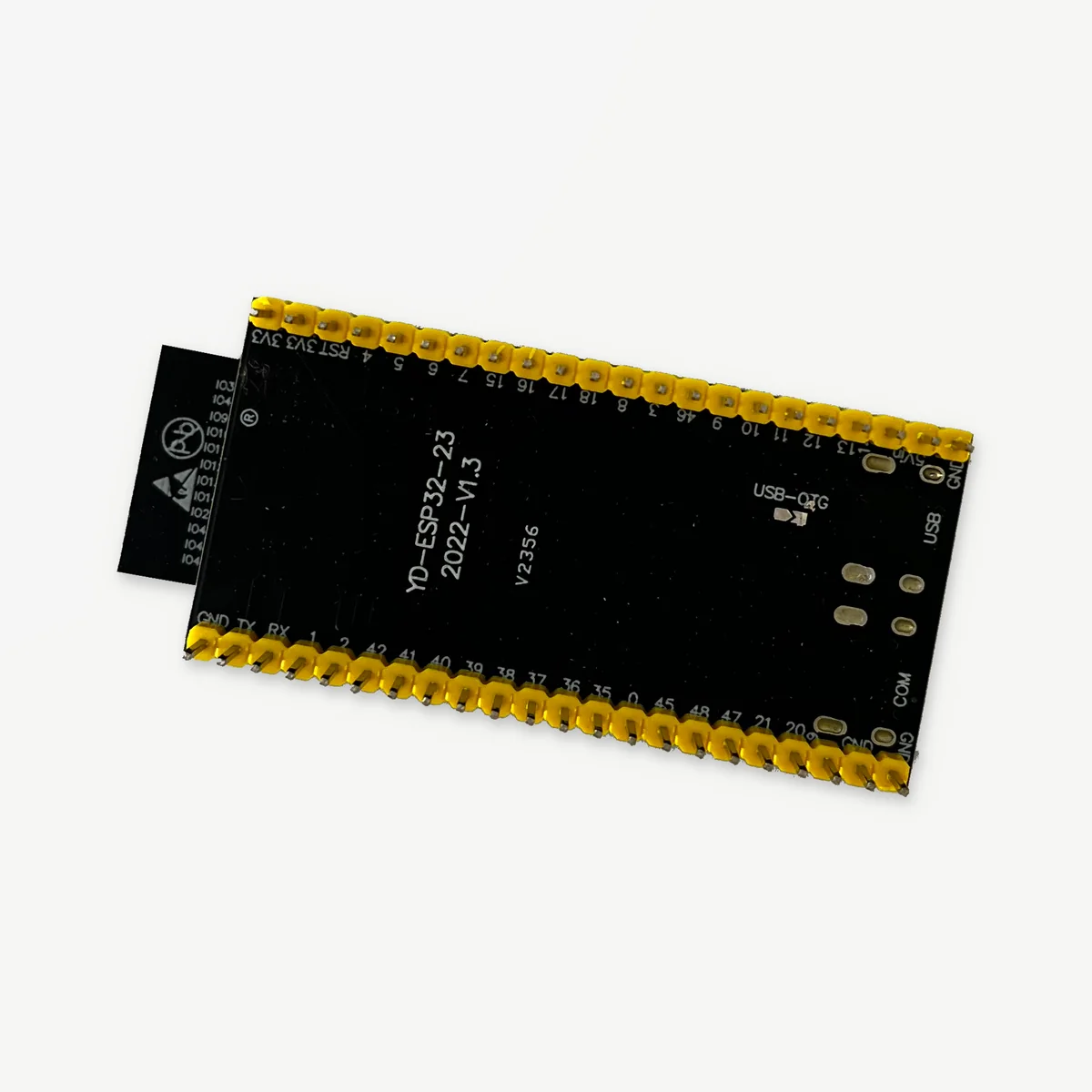
Look at the back of the board with the antenna at the top and the two USB-C ports at the bottom. The table follows the labels printed on this board, from top to bottom. Numbers are GPIO labels.
| Left · COM side | Right · USB side |
|---|---|
| GND | 3V3 |
| TX | 3V3 |
| RX | RST |
| 1 | 4 |
| 2 | 5 |
| 42 | 6 |
| 41 | 7 |
| 40 | 15 |
| 39 | 16 |
| 38 | 17 |
| 37 | 18 |
| 36 | 8 |
| 35 | 3 |
| 0 | 46 |
| 45 | 9 |
| 48 | 10 |
| 47 | 11 |
| 21 | 12 |
| 20 | 13 |
| 19 | 14 |
| GND | 5Vin |
| GND | GND |
Projects
The 8MB PSRAM gives you room for audio buffers, camera frames and the larger libraries that voice assistants and image projects use. The 16MB flash holds bigger firmware and model files.
Build temperature, humidity, presence or energy sensors in ESPHome. Wi-Fi updates mean you only plug it in once.
Make macro pads, shortcut keys, media controls or accessibility switches that plug into a PC, Mac, phone or tablet like an ordinary keyboard or mouse.
Sensors, cameras, microphones, displays and enclosures are not included.
Getting started
If you upload through the native USB port and it is not detected, or your last sketch took over the USB port, put the chip into download mode by hand: hold BOOT, press and release RST, then release BOOT. Select the new port and upload, then press RST to run your sketch. For USB HID sketches, set USB Mode to USB-OTG (TinyUSB).
The board also works with ESP-IDF, MicroPython and ESPHome.
In the box
One ESP32-S3 N16R8 development board with the pin headers already soldered on. Ready for a breadboard. A USB-C cable and an external antenna are not included; both are listed below.
FAQ
The port marked COM goes through the FT232R USB-to-serial chip. Use it for everyday flashing and the serial monitor. The port marked USB connects directly to the ESP32-S3’s native USB, so your firmware can make the board appear as a keyboard, mouse, gamepad or serial device. You can flash through either port.
The native USB port needs no extra driver on Windows 10/11, macOS or Linux. The COM port uses an FT232R USB-to-serial chip, which Windows 10/11, macOS and Linux usually recognise automatically. If no new COM port appears, install the FT232R virtual COM port (VCP) driver and try a different cable, because some USB-C cables only carry power.
The board is supplied using its PCB antenna. To switch to the IPEX (U.FL) socket, move the 0Ω antenna-selection resistor next to the module from the PCB-antenna position to the IPEX position, then fit a 2.4 GHz antenna with an IPEX/U.FL plug. Only one antenna path is active at a time. This needs fine soldering, so take care.
Yes. Add it in ESPHome as an ESP32-S3 with board esp32-s3-devkitc-1, set the flash size to 16MB, and enable PSRAM in octal mode if your configuration uses it. Flash the first build over USB, then update it over Wi-Fi from Home Assistant.
Yes, with suitable firmware. Through the native USB port the ESP32-S3 can act as a USB HID keyboard, mouse or media controller, for example a macro pad, shortcut buttons or a page turner. Computers accept it like any other USB keyboard. Phones and tablets that support USB keyboards over USB-C (most Android devices, and USB-C iPhones and iPads) can use it too. The COM port stays free for debugging while you test.
Each is sold separately. Check connectors and compatibility on the product page.
From our customers
No reviews yet
Reviews from verified buyers. Honest feedback, positive or negative, is welcome.
Purchased this product? Open the private review link in your order email to verify your purchase automatically.
Need an invitation? Contact us using your order email. No account is required.