Filament guides
PETG drying temperature, time & storage
To dry wet PETG, use the temperature and time specified for the exact series in suitable filament-drying equipment. Check the spool’s heat limit and the dryer’s instructions first. Store the filament sealed with dry desiccant after use. A storage box and an active dryer perform different jobs.
PETG drying temperature and time
These supplier references cover the named series in our range. They are not universal PETG settings or results from shop testing. Follow the current filament label and equipment limits.
| Filament | Drying temperature | Drying time |
|---|---|---|
| Bambu Lab PETG Basic | 65°C | 8 hours |
| greatsimple PETG HF | 60–65°C | 6–8 hours |
| R3D Economy, Marble & Ice Cream | Check the exact label; no verified drying value provided here | Check the exact label |
| Tinmorry PETG-ECO Pink | Check the exact label; no verified drying value provided here | Check the exact label |
The verified R3D Off-White and Transparent 3kg nozzle range describes printing temperature. It does not establish a drying temperature, drying time or spool heat limit. Do not use another brand’s drying profile to fill those gaps.
How to check and dry suspected damp PETG
- Record the symptoms. Popping, bubbles, a changed surface or increased stringing can indicate moisture. Check your print settings too; these signs are not conclusive.
- Identify the roll and spool. Read the exact material label. For a refill, check the reusable spool’s permitted temperature as well as the filament instructions.
- Check the equipment. It must accommodate the roll and support the specified drying conditions. Follow its loading, airflow and operating instructions. Do not use a food oven for filament. We do not currently sell dryers.
- Keep a baseline print. Run the same small print before and after drying and record the drying cycle so you can compare the results.
For manufacturer context, see Prusa’s drying guide and Bambu Lab’s filament drying guidance. Use the instructions for your actual filament and equipment; a different manufacturer’s table does not replace its label.
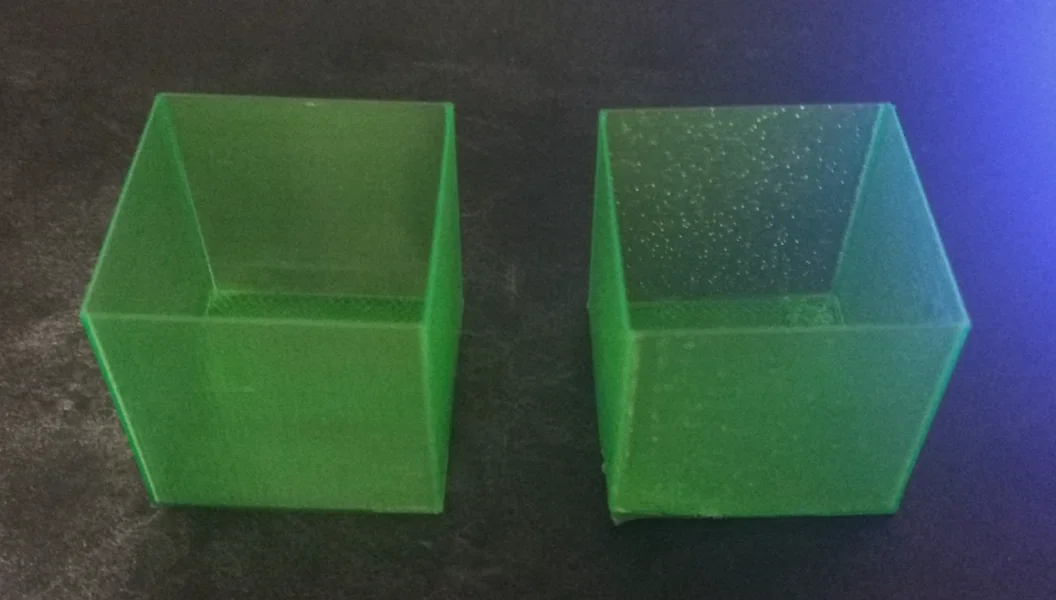
PETG before and after drying
In this published photo, both prints use the same single-wall cube design with no infill. Look at the inner wall on the right-hand print, where light specks are easier to see. The original post records which print came before and after drying. The PETG series and full slicer settings are unknown.
Run the same test with your roll
- Save one small sliced test. A single-wall cube makes surface marks easier to compare. A small two-post model gives you a gap to check for strings.
- Print it twice from the same roll. Run the file once before drying and once after following the filament supplier’s drying instructions. Use the same printer, nozzle, plate and slicer settings. Listen for popping on both runs.
- Compare under the same light. Photograph both parts from the same angle before removing any strands. Fewer bubbles, rough spots or interruptions after drying suggest moisture played a part. If the prints look similar and strings are the main symptom, continue with the nozzle, temperature and retraction checks.
Can desiccant dry an already wet roll?
Use sealed storage and dry desiccant to limit moisture exposure between prints. Do not treat storage alone as evidence that a damp roll has completed its specified drying process. Secure the loose end, keep the series identifiable and reseal unused filament.
Does PETG stringing mean it needs drying?
It can be one clue. Nozzle deposits, temperature and retraction also need checking. Follow the PETG stringing guide to compare those causes systematically.
Compare refill and spool packaging · Browse PETG filament · All guides